
SuperEx Guide: SuperEx Futures Trial Fund User Guide and FAQ(I)

#SuperEx #Guide #FAQ
🎁 New to SuperEx Futures Bonus Credit?
The SuperEx Futures Trial Fund (Bonus Credit) helps reduce trading costs by covering part of your futures trading losses, fees, funding fees, and liquidation fees — giving traders an extra layer of protection while learning and exploring the futures market.
Learn how to:
✅ Obtain Bonus Credit
✅ Activate vouchers
✅ Complete activation tasks
✅ Understand offset ratios & validity periods
✅ Maximize your trading benefits
What Is Futures Bonus Credit
Futures Bonus Credit (hereinafter referred to as the “Bonus Credit”) is a futures trading benefit voucher issued by the SuperEx platform to users. It is used to partially offset trading losses, trading fees, funding fees, and liquidation fees incurred in USDT-Margined Perpetual Futures trading.
Nature of the Bonus Credit
- Bonus Credit is not real withdrawable funds and cannot be directly transferred to other accounts or withdrawn.
- The purpose of Bonus Credit is to bear a portion of trading losses according to the configured ratio when losses occur, thereby replacing part of the user’s own funds.
- Users must contribute their own funds in order to use Bonus Credit for futures trading; Bonus Credit cannot be used independently to open positions.
- The Bonus Credit balance can only decrease and will not increase due to trading profits or positive funding fee income.
Value of the Bonus Credit
During its validity period, Bonus Credit provides users with a loss buffer. When trading losses occur, the system will cover a portion of the losses using the Bonus Credit according to the predefined ratio, thereby reducing the consumption of the user’s own funds.
- Cick to register SuperEx
- Cick to downoad the SuperEx APP
- Cick to enter SuperEx CMC
- Cick to enter SuperEx DAO Academy — Space
How to Obtain Bonus Credit
Currently, Bonus Credit can be obtained through the following methods:
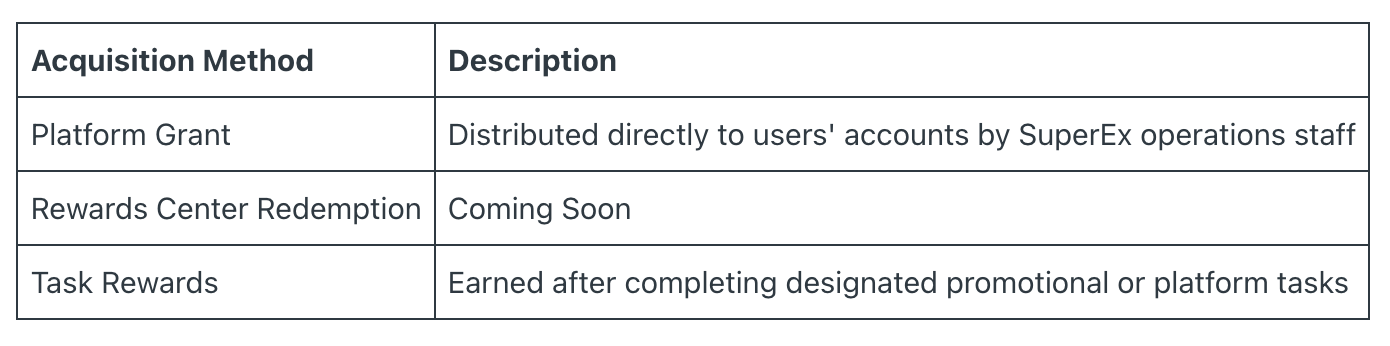
After receiving a Bonus Credit voucher, users can view it on the “Coupon Management” page in the App or PC version.
Bonus Credit Voucher Information
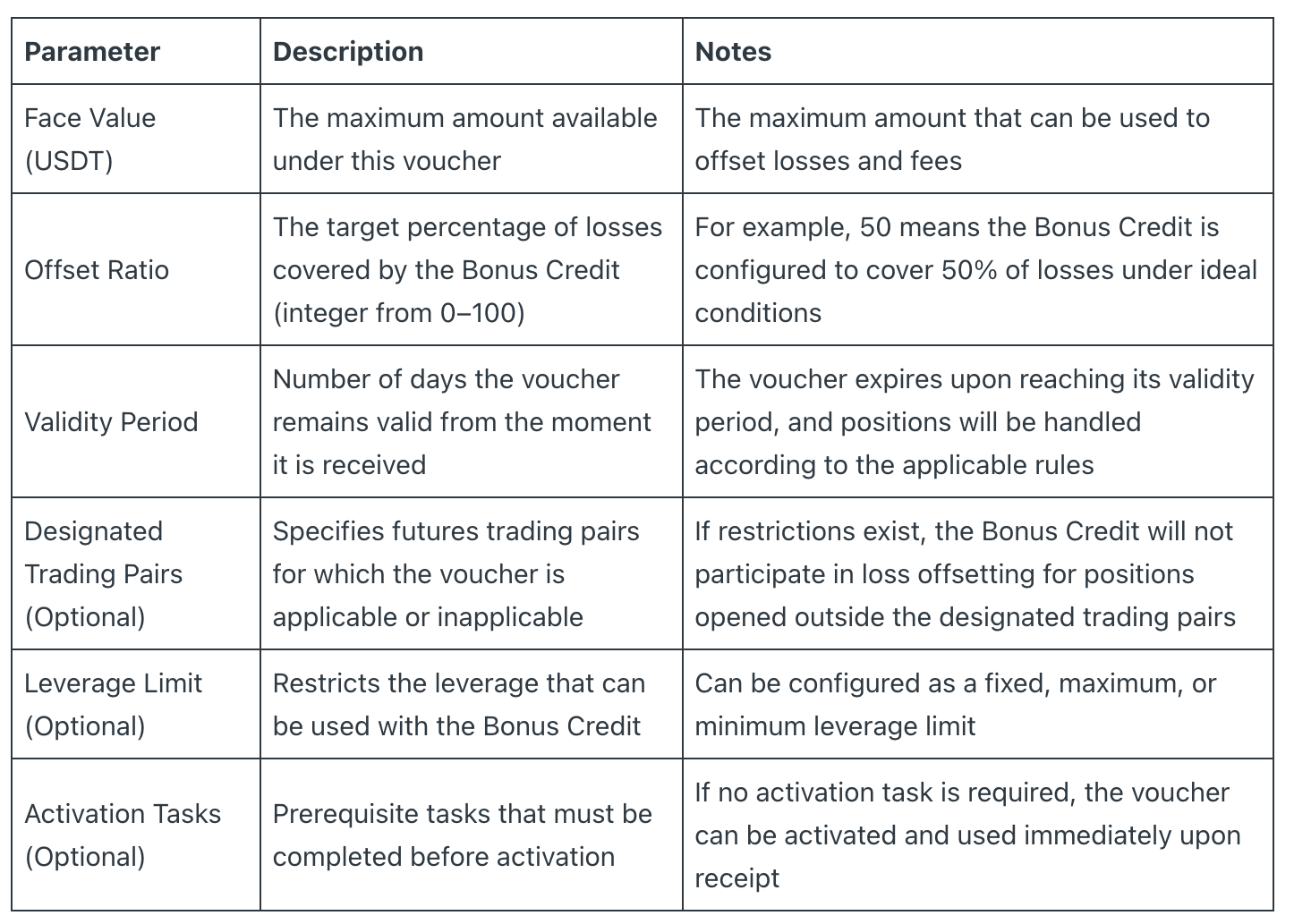
Each Bonus Credit voucher contains the following key parameters:
Face Value
The face value represents the maximum amount of USDT that the voucher can use to offset losses and fees for the user.
Users may use all or part of the face value when opening positions.
After use, the Bonus Credit balance decreases accordingly. Any remaining balance may continue to be used for subsequent trades until the face value is exhausted or the voucher expires.
After a position is closed, any remaining Bonus Credit balance can be used again to open new positions.
Offset Ratio
The offset ratio defines the target percentage of losses that the Bonus Credit is intended to cover under ideal conditions.
For example, if the offset ratio is 50%, the system will first attempt to have the Bonus Credit cover 50% of the loss, while the user’s own funds cover the remaining 50%.
If the Bonus Credit balance is sufficient, losses will be offset according to the configured ratio. If either side does not have enough balance to cover its allocated portion, the shortfall will be covered by the other side.
In the event of liquidation, losses are allocated according to the actual proportion of each party’s contribution to the total margin (see Section 5.4 for details).
Validity Period
The validity period begins from the moment the user receives the voucher, not from the moment it is activated.
Users must complete activation and use the voucher for trading within its validity period.
Once the validity period expires, the Bonus Credit voucher becomes invalid immediately, and the system will initiate the expiration handling process (see Section 7 for details).
How to Activate Bonus Credit
Vouchers Without Activation Tasks
If a Bonus Credit voucher does not contain any activation tasks:
- Go to “Coupon Management” → “Pending Use” and locate the corresponding voucher.
- Click the “Use Now” button.
- The system will verify whether your Futures Account has been activated. If not, you will be guided through the Futures Account activation process (after completion, you will be redirected back to the Coupon Center).
- The Bonus Credit amount will be displayed in both the Cross Margin and Isolated Margin accounts under your USDT-Margined Futures Account.
- You may then proceed to the Futures Trading interface and start using the Bonus Credit.
Vouchers With Activation Tasks
If a Bonus Credit voucher contains activation tasks:
- Go to “Coupon Management” → “Pending Use” and click “Activate Now”.
- The system will display the activation task list and the completion progress.
- Users must complete the required tasks according to the specified requirements (such as achieving a required futures trading volume, making a deposit, inviting friends, completing KYC verification, etc.).
- After completing the tasks, please wait for the system’s automatic verification (approximately 5 minutes delay; the actual data refresh frequency is subject to platform announcements).
- Once the system confirms task completion, the voucher status will be updated, and users may click “Use Now” to complete the activation process.
Multi-Task Logic
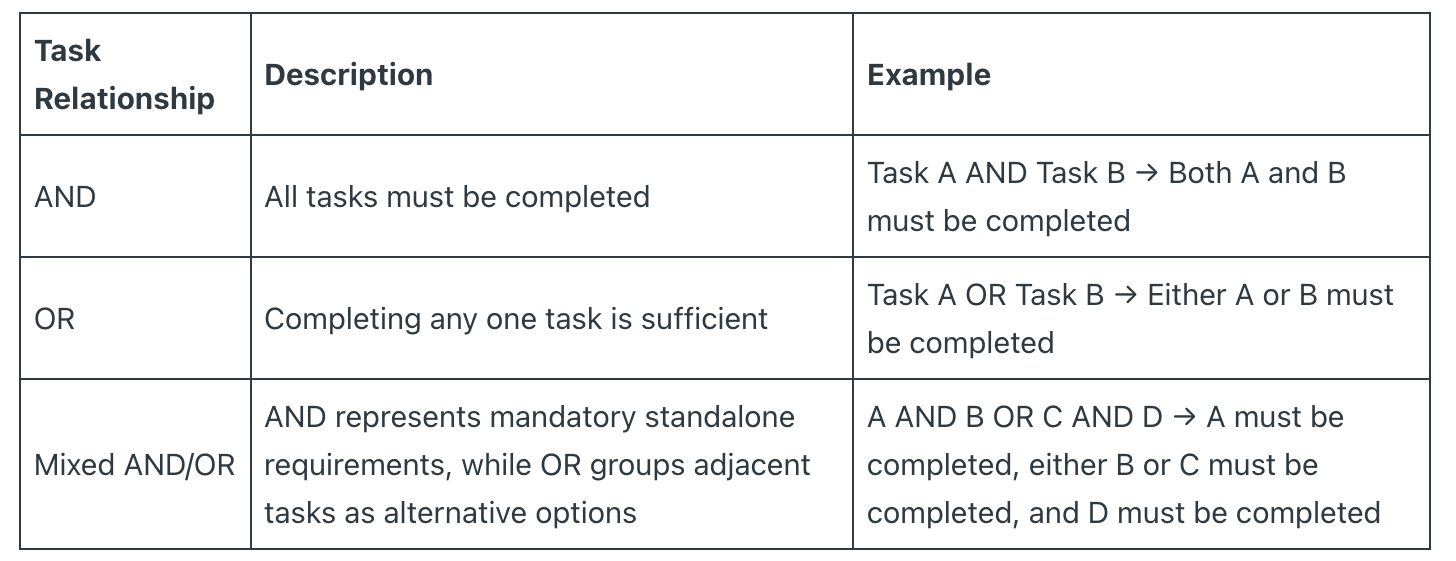
Types of Activation Tasks
- USDT-Margined Futures Trading Volume (futures trading volume completed after receiving the voucher)
- Spot Trading Volume (spot trading volume completed after receiving the voucher)
- Deposit Amount
- Number of Invited Friends
- Completion of KYC Identity Verification
Note: Futures trading volume generated using Futures Bonus Credit will also be counted toward the futures trading volume requirement for activation tasks.
Task Progress Tracking
The system automatically updates task completion progress every 5 minutes. Progress is displayed as an integer percentage.
If a user has just completed a task, the actual update may be delayed by up to 5 minutes, which is considered normal behavior.




Responses