
SuperEx Guide:Futures Trading-Advanced Trading Journey(VIV)

@2x-1024x576.png)
#SuperEx #CopyTrading #FuturesTrading
In the previous article, we used a detailed visual guide to explain how to become a successful Lead Trader. In today’s lesson, we’ll focus on the other key role in Copy Trading: how to become a Follower.
Follow our step-by-step visual guide to learn exactly how the process works.

How to Use Copy Trading in SuperEx Futures
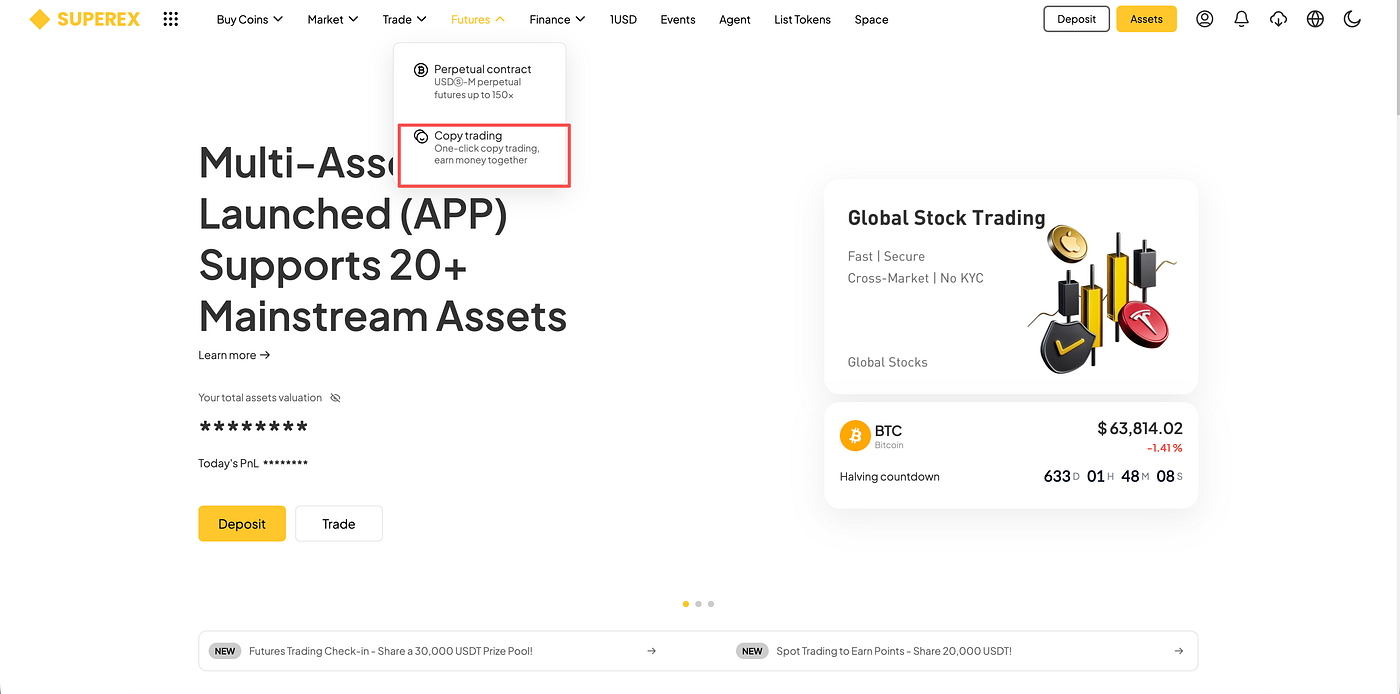
Step1:Log in to your SuperEx account and click on [Trade] — [Futures Copy Trading].
Step2:In the trading plaza, you can filter traders using the following criteria:
- Time Range: 7/30/90-day performance
- Trader Performance Metrics: Total follower profit, ROI, total profit, AUM (Assets Under Management), number of followers, maximum drawdown
- Search: Filter traders by searching their UID or nickname

Step3:After selecting a trader, set your copy trading parameters:
- Copy Trading Amount
- Advanced Settings: Position Take Profit / Position Stop Loss / Maximum Margin Per Order

Step4:You can view your ongoing and completed copy trades.

Ongoing Copy Trades:
- [Adjust Balance]: You can add more funds or withdraw part of the copy trading amount. The maximum copy trading amount is 200,000 USDT.
Note: If the portfolio still has open positions, withdrawal is not supported.
- [Copy Trade Settings]: Adjust position take profit/stop loss and the maximum amount per copied order.
- [End Copy Trade]: The system will close all copied positions at market price, and the assets will be transferred back to your spot account.
Please note that due to price fluctuations, the final settled amount may differ slightly. The expected profit share may also change depending on any open positions.


Click [Expand Details] to view:
- Current Positions / Historical Positions / Order History / Trade History / Transfer Records / My Profit Share / Fund Flow

You can also go to [Wallet] — [Copy Trading Account] to view project details.






Responses